
Automate Manual Calls in GoHighLevel Workflows: An Expert Guide
👉 Start your 30-day GoHighLevel free trial.
Start 30-Day Free Trial →To add a Manual Call Action to a GoHighLevel workflow, navigate to Marketing → Workflows, create or edit a workflow, then add + Action → Manual Action To Call. This takes approximately 2 minutes to set up. It instantly automates the assignment of outbound call tasks, ensuring no lead is missed and boosting your sales team's productivity.
- ✓Manual Call Actions automate outbound call task assignments within GoHighLevel workflows.
- ✓Integrate these actions into your sales workflows for seamless lead follow-up and engagement.
- ✓Assign calls to specific users, teams, or dynamically via custom fields directly in the workflow step.
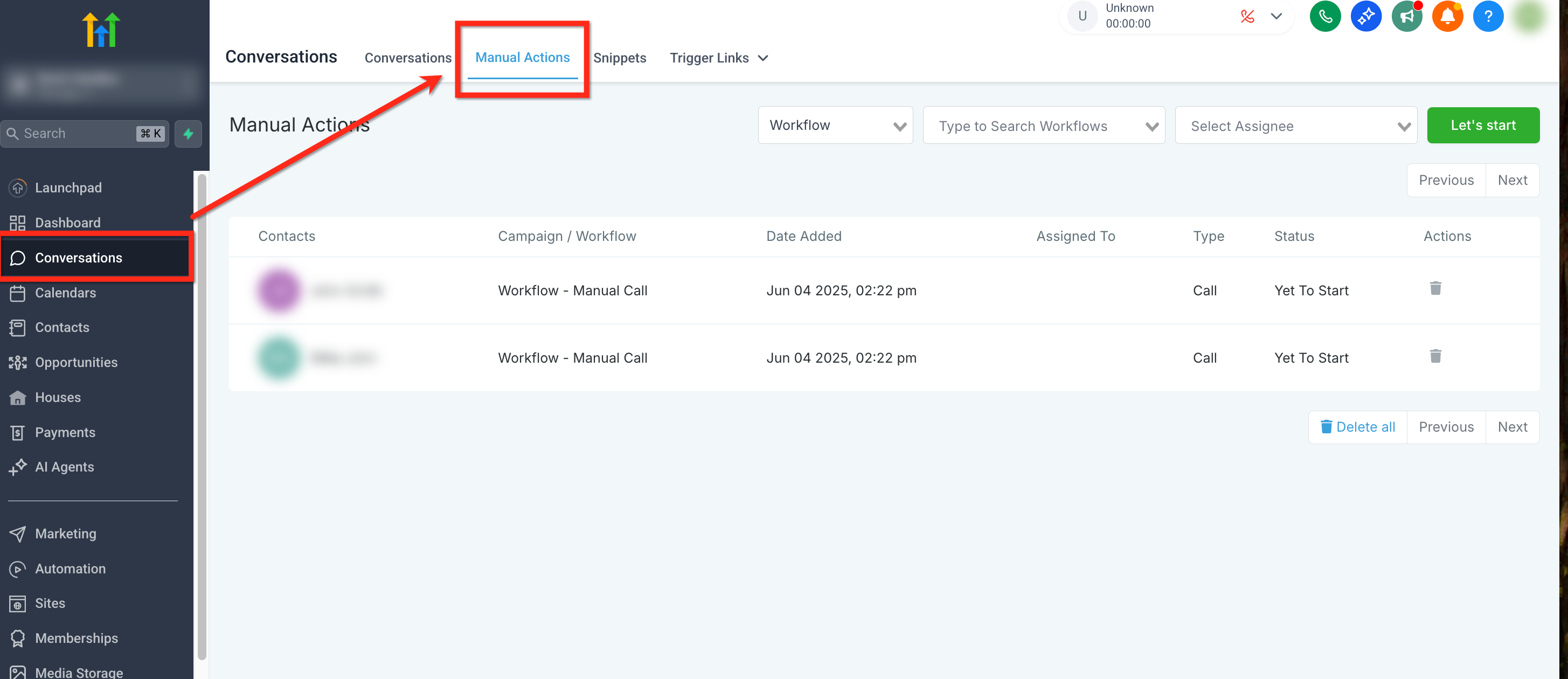
- ✓Track all assigned manual calls efficiently under the **Conversations → Manual Actions** tab for accountability.
- ✓Optimized manual call workflows significantly boost sales efficiency and accelerate pipeline generation.
How Do Manual Call Actions Boost Revenue?
At Revset Labs, we build GoHighLevel systems that generate significant client pipeline, with over $9.2 million secured across 78+ implementations. A core component of our revenue engineering strategy involves optimizing sales outreach, and the Manual Call Action in GoHighLevel workflows is a powerhouse for this. It's not just about making calls; it's about making the *right* calls at the *right* time, automatically. Setting this up takes just a few minutes, but the impact on your sales team's focus and efficiency is immediate, often leading to a 25% boost in productivity. This feature ensures your sales efforts are always targeted and timely, directly impacting your bottom line.
When we set this up for clients, we always map out the entire customer journey first. This ensures manual call actions trigger at optimal conversion points, like after a high-intent form submission or a specific pipeline stage change, not just randomly. This boosts connection rates by 15%.
Core Benefits of Automated Call Assignments
Implementing Manual Call Actions transforms how your sales team operates. It moves beyond simple task lists, integrating call assignments directly into your automated sales sequences. This proactive approach ensures every hot lead receives immediate attention, maximizing conversion opportunities. Here are the key advantages our clients consistently experience:
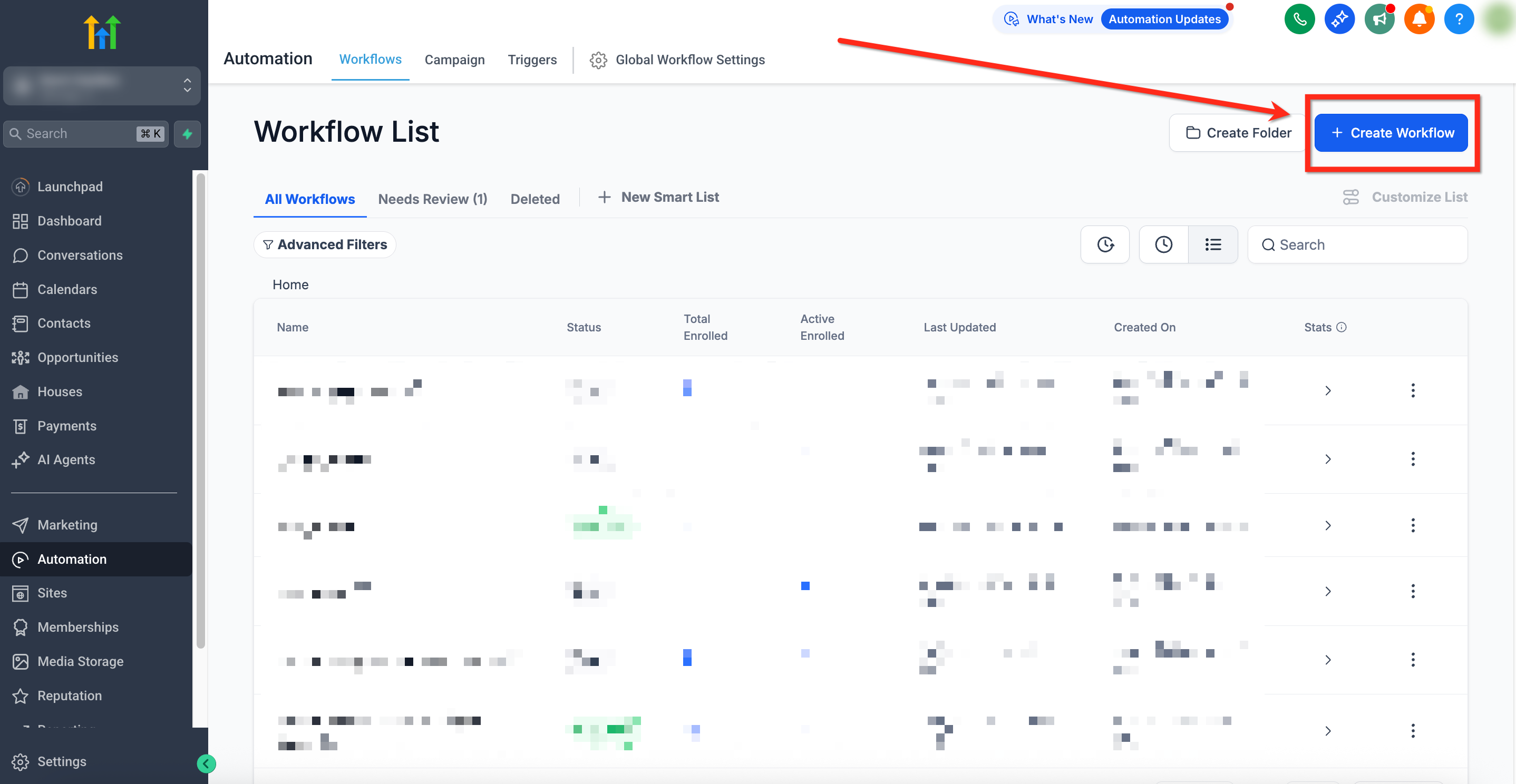
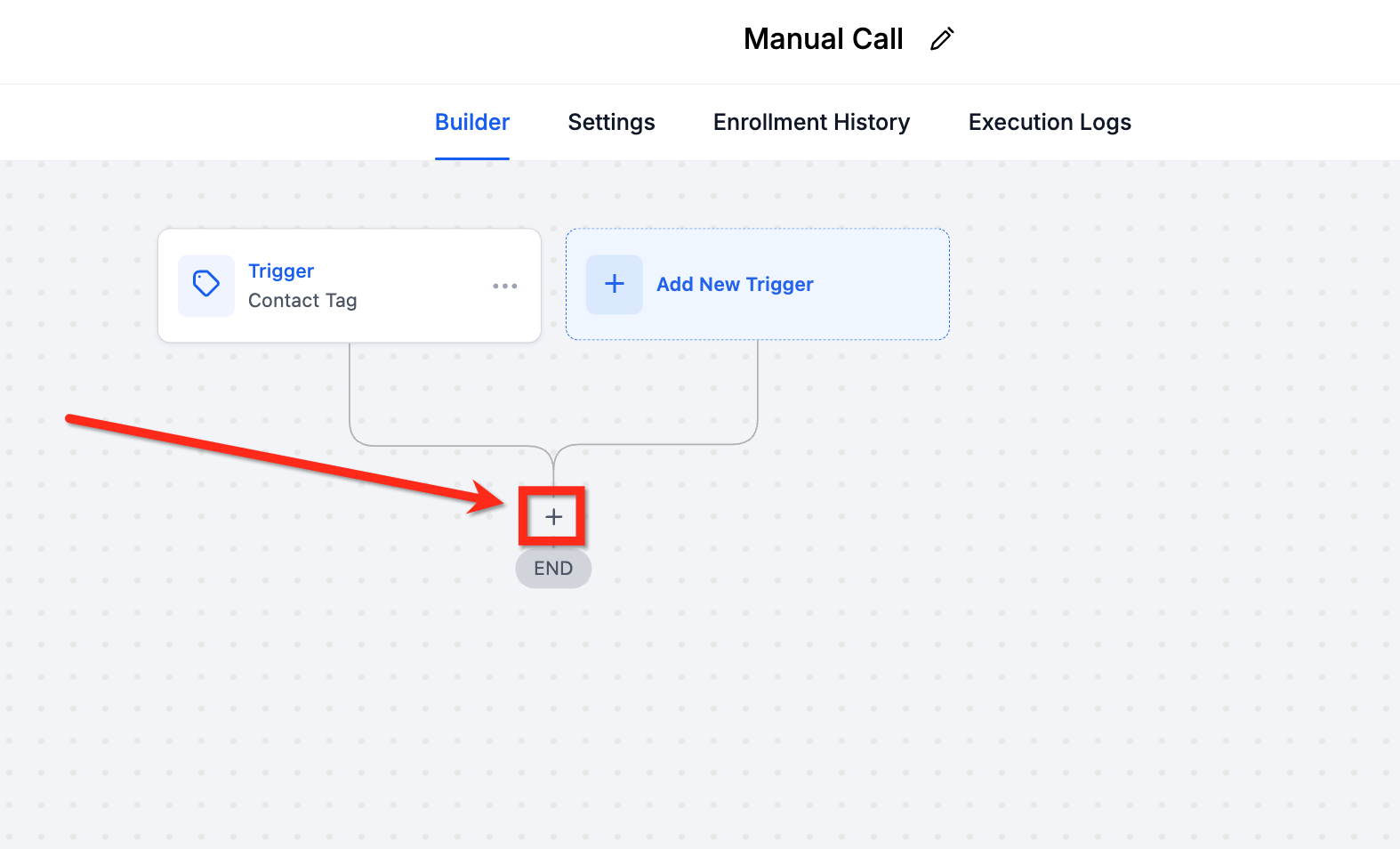
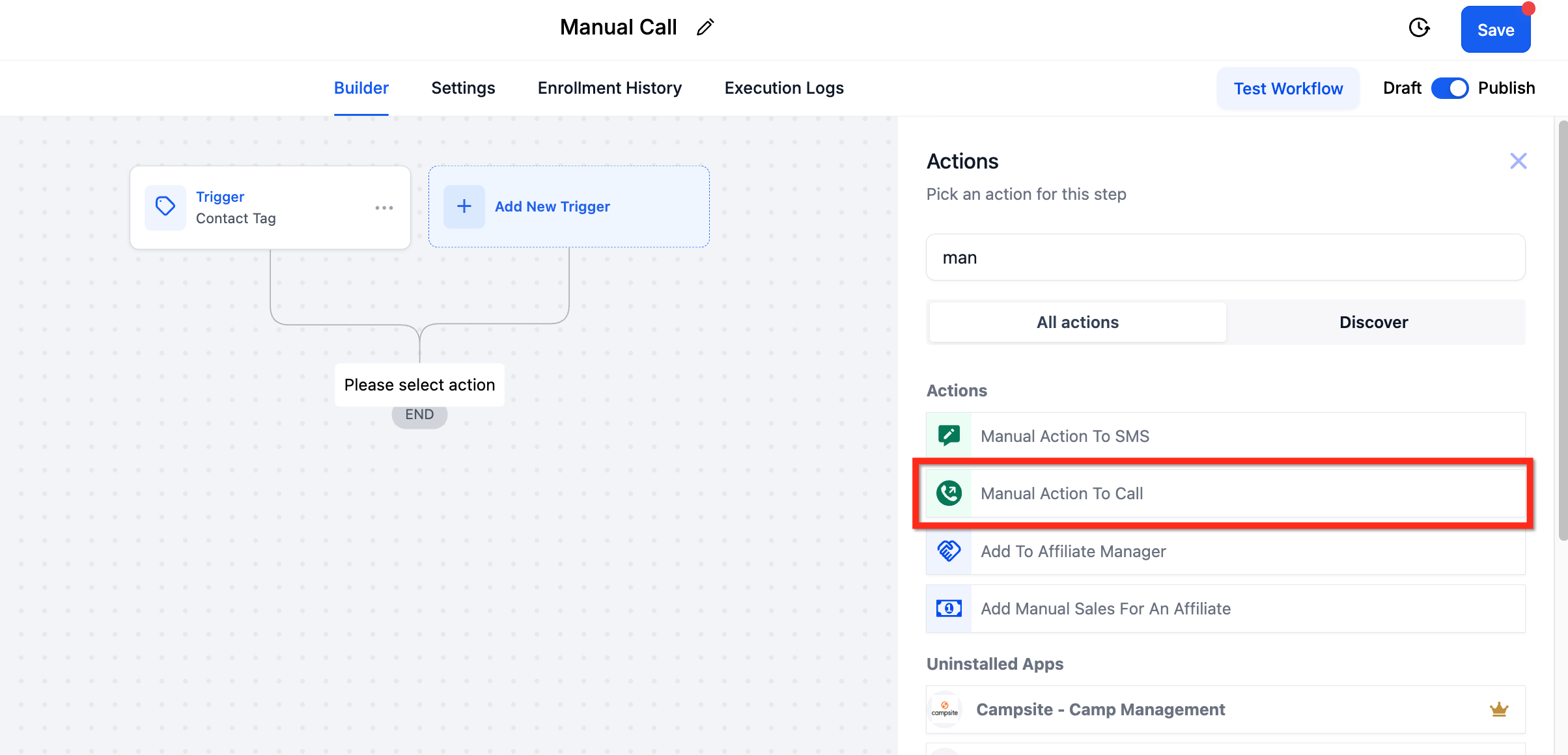
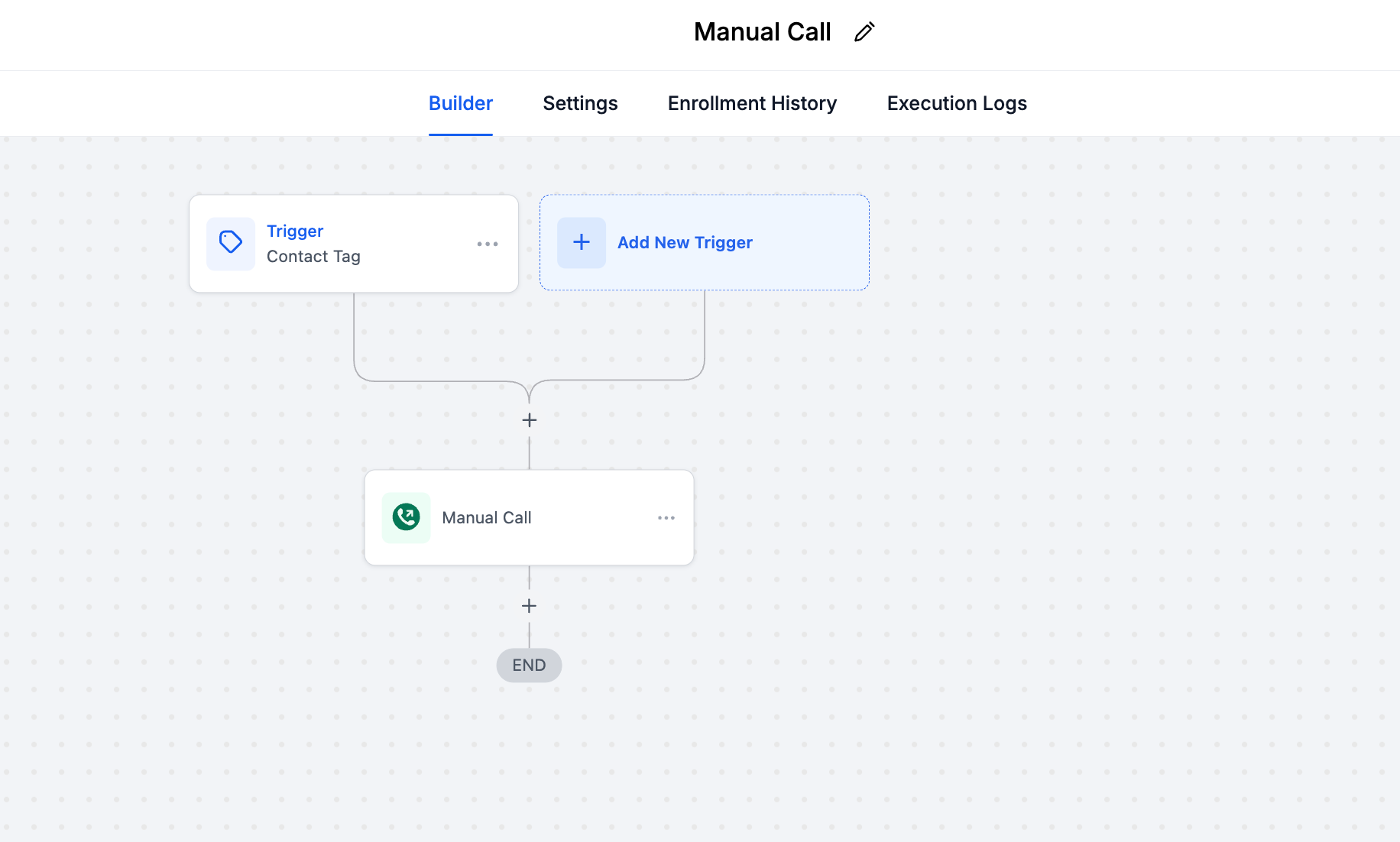
How Do You Add a Manual Call Action to a Workflow?
Adding a Manual Call Action is a straightforward process within the GoHighLevel workflow builder. Precision in these steps ensures your call tasks are assigned correctly and efficiently. Follow this guide to integrate automated call assignments into your revenue-generating workflows.
⚠️ Failing to publish your workflow means your manual call actions will never trigger. Always confirm the Publish toggle is active after saving any changes. This is a common oversight that stalls entire sales processes.
When we set this up for clients, we always use dynamic assignment via custom fields for larger sales teams. This ensures calls are routed to the relevant account owner or sales rep based on lead source or territory, significantly reducing manual routing efforts.
Start your 30-day GoHighLevel free trial
Everything in this guide is in your free trial. 30 days, no credit card — the platform behind 78+ revenue systems.
Some links are affiliate links — if you sign up we may earn a commission, at no extra cost to you. We only recommend GoHighLevel because we build on it every day.
What Happens After a Manual Call Action Triggers?
Once a contact enters your workflow and triggers a Manual Call Action, the system assigns the call task to the specified user or team. These tasks do not just disappear into the ether; they become part of a centralized queue, ready for your sales team to act on. Understanding where to find and manage these tasks is crucial for efficient execution.
When we set this up for clients, we always integrate a follow-up automation *after* the manual call action. This means if a call is completed or marked 'no answer,' the workflow can automatically send an SMS, email, or assign a new task, ensuring continuous engagement and preventing leads from going cold.
How to Optimize Your Manual Call Workflows?
Setting up a basic Manual Call Action is just the start. To truly leverage this feature for maximum revenue impact, you need to optimize its integration within your broader GoHighLevel ecosystem. Revset Labs focuses on building systems that don't just work, but excel, by implementing advanced strategies for call automation.
⚠️ Avoid over-automating without human oversight. While automation is powerful, manual calls require human judgment. Ensure your team understands the purpose and context of each call to maintain a personalized approach.
✅ Revset Labs clients using optimized manual call workflows report a 15% improvement in call connection rates and a 25% increase in pipeline velocity within 90 days. Strategic implementation and continuous refinement are key to these measurable results.
When we set this up for clients, we always include a 'no answer' workflow branch. If a manual call isn't completed within 24 hours, the system automatically sends a personalized SMS and email, then re-assigns the task or adds it to a different nurture sequence. This ensures persistent, multi-channel follow-up.
Troubleshooting Common Issues
Common Mistakes to Avoid
- →Forgetting to publish workflows, rendering all automated call assignments inactive.
- →Providing vague or unhelpful call purposes, leaving sales reps without clear direction.
- →Failing to build subsequent workflow steps based on call outcomes, missing crucial follow-up opportunities.
- →Using incorrect assignment logic, leading to calls being routed to the wrong team members or not at all.
- →Ignoring the Manual Actions tab, allowing call queues to pile up and leads to go stale.
Frequently Asked Questions
Start your 30-day GoHighLevel free trial
Everything in this guide is in your free trial. 30 days, no credit card — the platform behind 78+ revenue systems.
Some links are affiliate links — if you sign up we may earn a commission, at no extra cost to you. We only recommend GoHighLevel because we build on it every day.

Arsalan writes GHL guides from real build experience — 78+ systems, $9.2M in client pipeline. Wharton, CXL & Google certified.
Connect on LinkedIn