
Mastering the Contact Date Of Birth Field in GoHighLevel
👉 Start your 30-day GoHighLevel free trial.
Start 30-Day Free Trial →To leverage the Contact Date Of Birth field in GoHighLevel, add it to your contact records or forms to enable powerful automation and segmentation. This feature allows you to create automated birthday campaigns and filter contacts by age in Smart Lists. Setting up a basic birthday automation takes approximately 5-10 minutes.
- ✓Always capture birthday data directly on lead capture forms for immediate use.
- ✓Ensure all birthday entries use the MM/DD/YYYY format for accurate system processing.
- ✓Thoroughly test all birthday workflows with test contacts before publishing them live.
- ✓Utilize Smart Lists to segment contacts by age, enabling highly targeted marketing campaigns.
- ✓Personalize birthday messages using custom values to significantly boost engagement rates.
What is the GoHighLevel Contact Date Of Birth Field?
The Contact Date Of Birth field is a crucial standard system field in GoHighLevel, designed to store a contact's exact birth date (Month/Day/Year). This field is essential for personalizing your marketing efforts and automating key interactions. It serves as the foundation for creating targeted birthday campaigns and segmenting your audience based on age.
Always include the Date Of Birth field in your lead capture forms. Gathering this data upfront ensures you can immediately leverage it for personalized automation and segmentation without manual entry later.
How to Create Automated Birthday Campaigns in GoHighLevel?
Automated birthday campaigns are a powerful way to engage your audience, build loyalty, even drive sales with personalized offers. GoHighLevel workflows make it simple to send timely messages directly to your contacts on or around their special day. You can set up emails, SMS, or even internal tasks to celebrate with your customers.

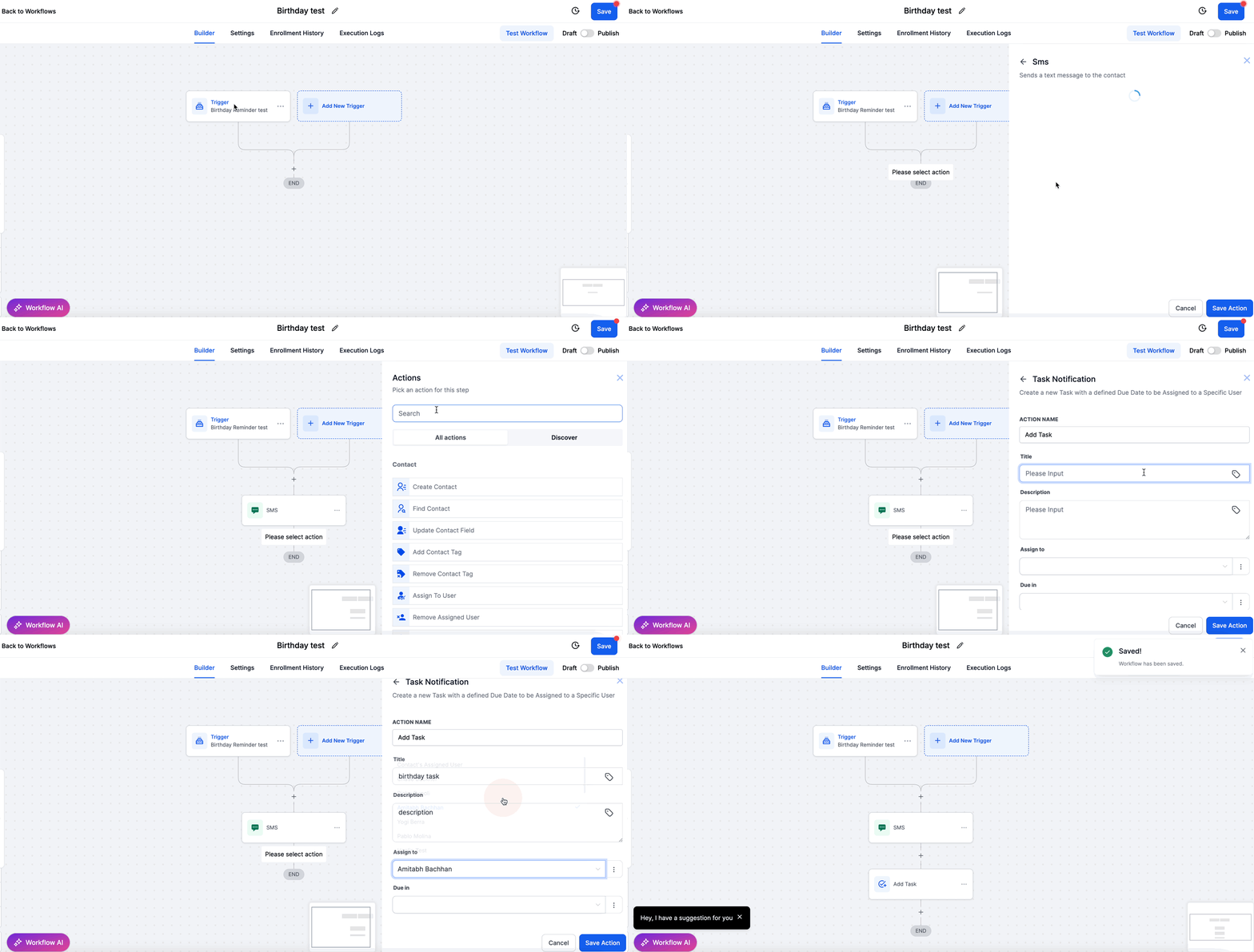
⚠️ Ensure your contacts' Date Of Birth fields are populated and in the correct MM/DD/YYYY format. Workflows will not trigger for contacts with missing or improperly formatted birthday data.
Always test your birthday workflows with a sample contact before publishing. Set a test contact's birthday to a few minutes or hours in the future to confirm all actions (email, SMS) trigger and send correctly.
Start your 30-day GoHighLevel free trial
Everything in this guide is in your free trial. 30 days, no credit card — the platform behind 78+ revenue systems.
Some links are affiliate links — if you sign up we may earn a commission, at no extra cost to you. We only recommend GoHighLevel because we build on it every day.
How to Filter and Segment Contacts by Age in GoHighLevel?
Segmenting your contacts by age allows you to deliver highly relevant content and offers, increasing engagement and conversion rates. GoHighLevel's Smart Lists use the Date Of Birth field to dynamically calculate age, letting you create targeted groups based on specific age ranges. This is invaluable for age-specific promotions or communications.

Combine age filters with other contact properties like location or tags to create hyper-targeted Smart Lists. This allows for incredibly precise marketing campaigns tailored to very specific audience segments.
Troubleshooting Common Issues
Common Mistakes to Avoid
- →Neglecting to capture birthday information early in the lead generation process.
- →Using inconsistent or incorrect date formats (e.g., DD/MM/YYYY instead of MM/DD/YYYY) when manually entering or importing birthdays.
- →Failing to thoroughly test birthday workflows with test contacts, leading to unexpected behavior on live launch.
- →Sending generic birthday messages instead of personalized content, missing an opportunity to build stronger relationships.
- →Overlooking time zone settings in workflows, which can cause birthday messages to be delivered at inconvenient times for contacts.
Frequently Asked Questions
Start your 30-day GoHighLevel free trial
Everything in this guide is in your free trial. 30 days, no credit card — the platform behind 78+ revenue systems.
Some links are affiliate links — if you sign up we may earn a commission, at no extra cost to you. We only recommend GoHighLevel because we build on it every day.

Arsalan writes GHL guides from real build experience — 78+ systems, $9.2M in client pipeline. Wharton, CXL & Google certified.
Connect on LinkedIn