
How to Setup Automatic Calls and Voicemail Drops in GoHighLevel
👉 Start your 30-day GoHighLevel free trial.
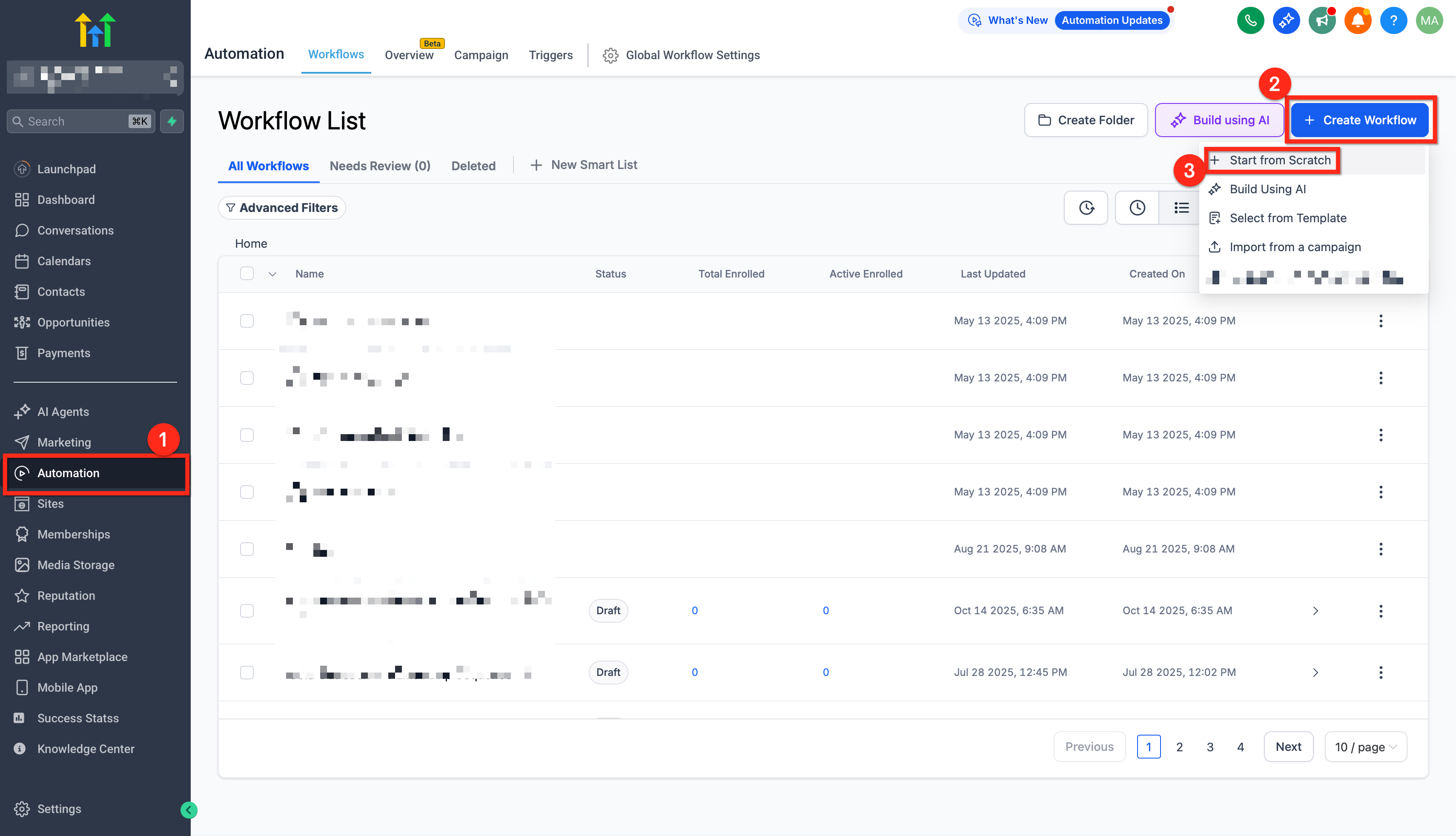
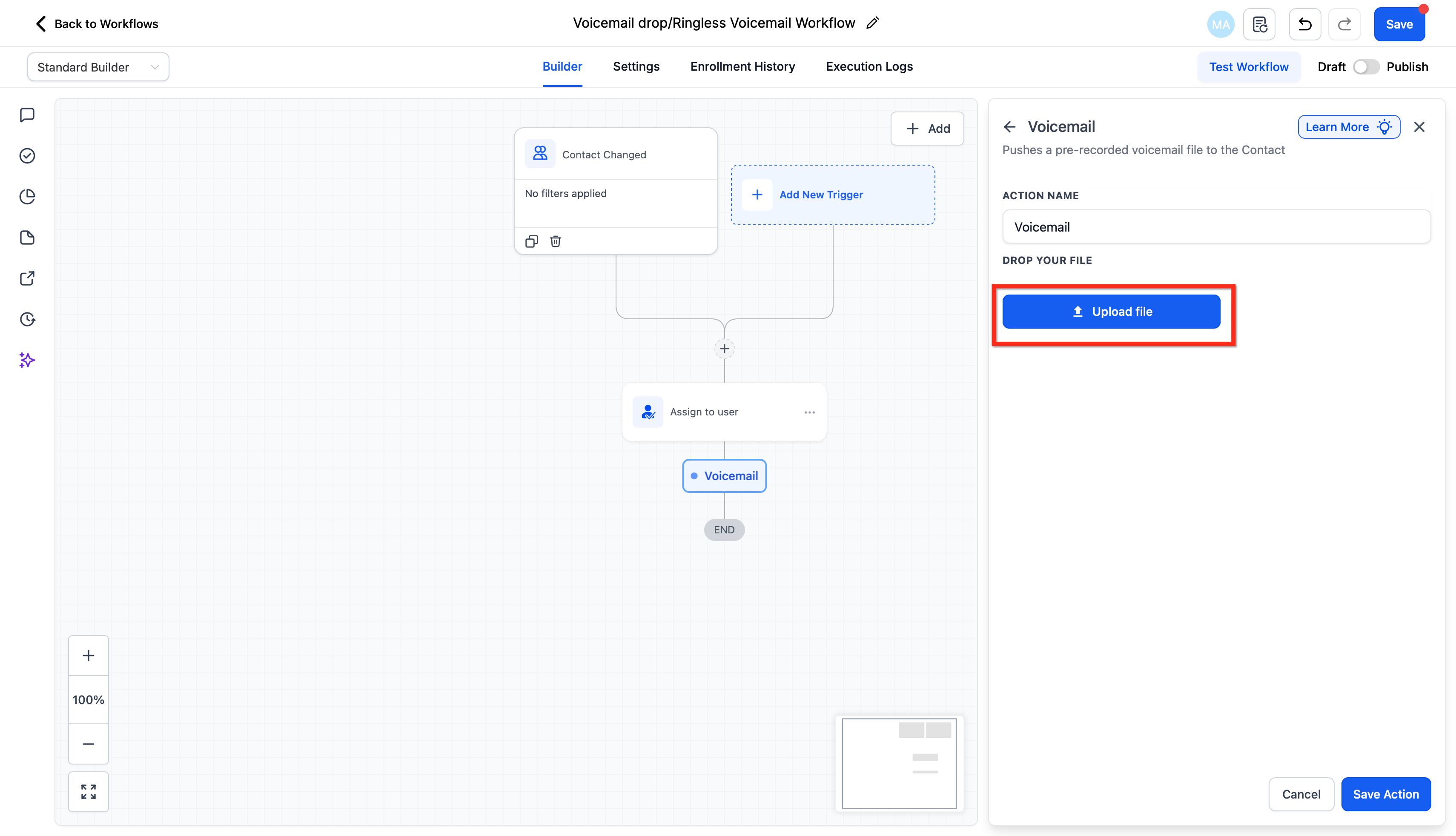
Start 30-Day Free Trial →To set up automatic calls and voicemail drops, go to Automation → Workflows in your GoHighLevel sub-account. You will create or edit a workflow and add a "Voicemail" action with your pre-recorded audio file. This essential setup takes approximately 5-10 minutes to complete.
- ✓Always secure prior express consent from contacts before sending automated voicemail drops to ensure legal compliance.
- ✓Prepare your voicemail audio files in MP3 or WAV format, ideally at 64kbps, for optimal delivery and quality within GoHighLevel.
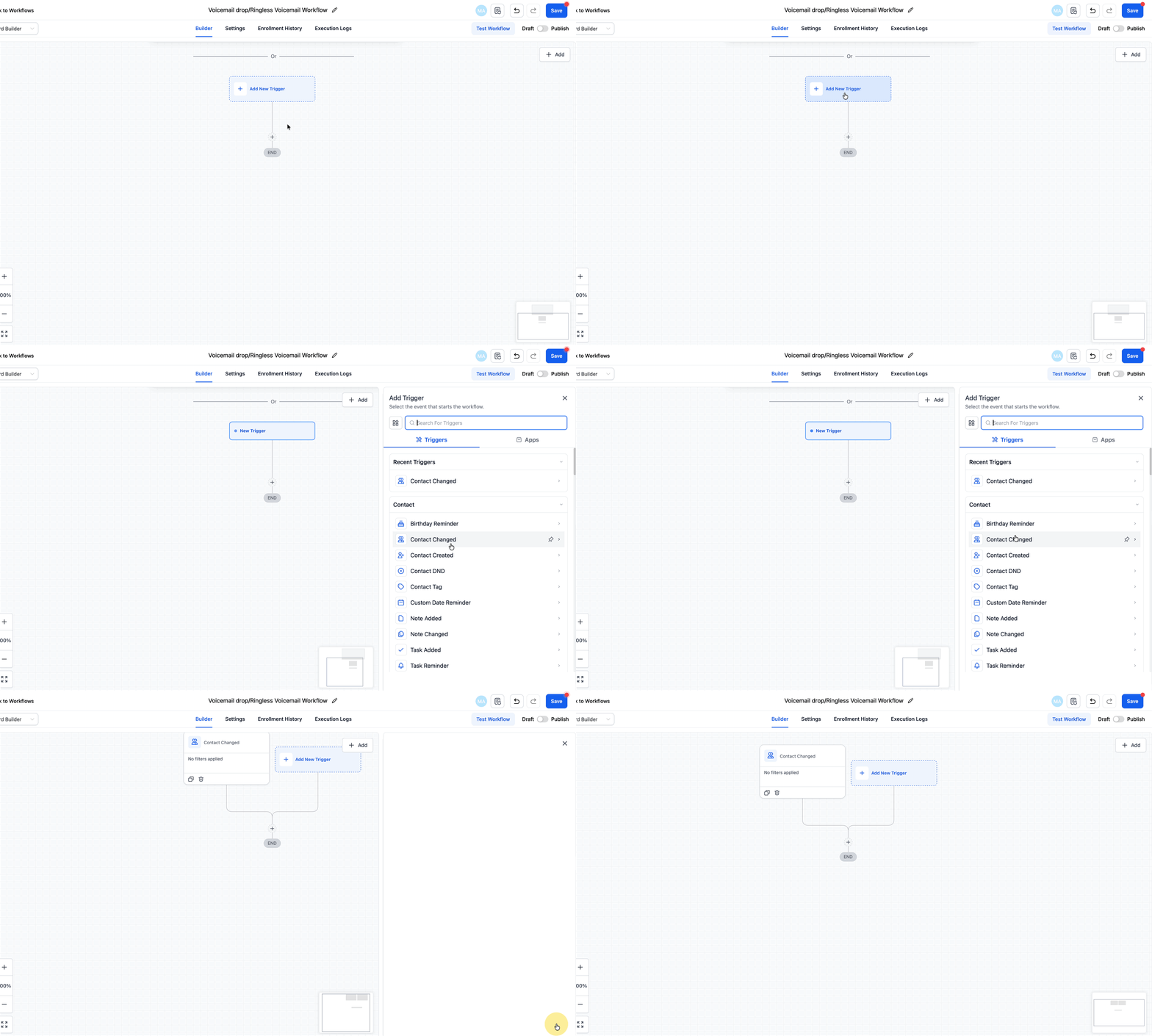
- ✓Utilize GoHighLevel Workflows to automate voicemail drops, setting specific triggers like 'Contact Changed' or 'Appointment Status' for precise timing.
- ✓Thoroughly test your voicemail drop workflows with a test contact before publishing to a live audience to verify functionality and message delivery.
- ✓Be aware of daily voicemail drop limits which increase over time; contact GoHighLevel support if you require higher volumes for your campaigns.
What are Automatic Calls and Voicemail Drops?
Automatic calls and voicemail drops in GoHighLevel allow you to deliver pre-recorded audio messages directly to a contact's voicemail inbox without their phone ever ringing. This powerful feature enables you to communicate important information efficiently and at scale, maintaining a personal touch even with high volumes of outreach. It reduces interruptions for your contacts while ensuring your message is heard. This automation is perfect for various scenarios, from confirming appointments and recovering no-shows to nurturing new leads. By integrating voicemail drops into your workflows, you can significantly improve follow-up speed, enhance responsiveness, and streamline your communication strategy, ensuring consistent engagement with your audience.
What You Need Before Setting Up Voicemail Drops
Before you can implement automatic calls and voicemail drops, you must ensure your GoHighLevel sub-account is properly configured and you have the necessary assets ready. These prerequisites are crucial for the legal and technical success of your campaigns. Taking these steps upfront will save you time and prevent potential issues during setup.
⚠️ Voicemail drops are subject to regulations like the TCPA. Sending messages without prior express consent from recipients is illegal and can lead to significant fines and lawsuits. Always prioritize compliance.
If your audio file is not 64kbps, use an online audio converter like online-audio-converter.com to adjust the bitrate. Lower bitrates are generally better for voicemail drops.
Start your 30-day GoHighLevel free trial
Everything in this guide is in your free trial. 30 days, no credit card — the platform behind 78+ revenue systems.
Some links are affiliate links — if you sign up we may earn a commission, at no extra cost to you. We only recommend GoHighLevel because we build on it every day.
How to Setup Automatic Voicemail Drops in GoHighLevel Workflows
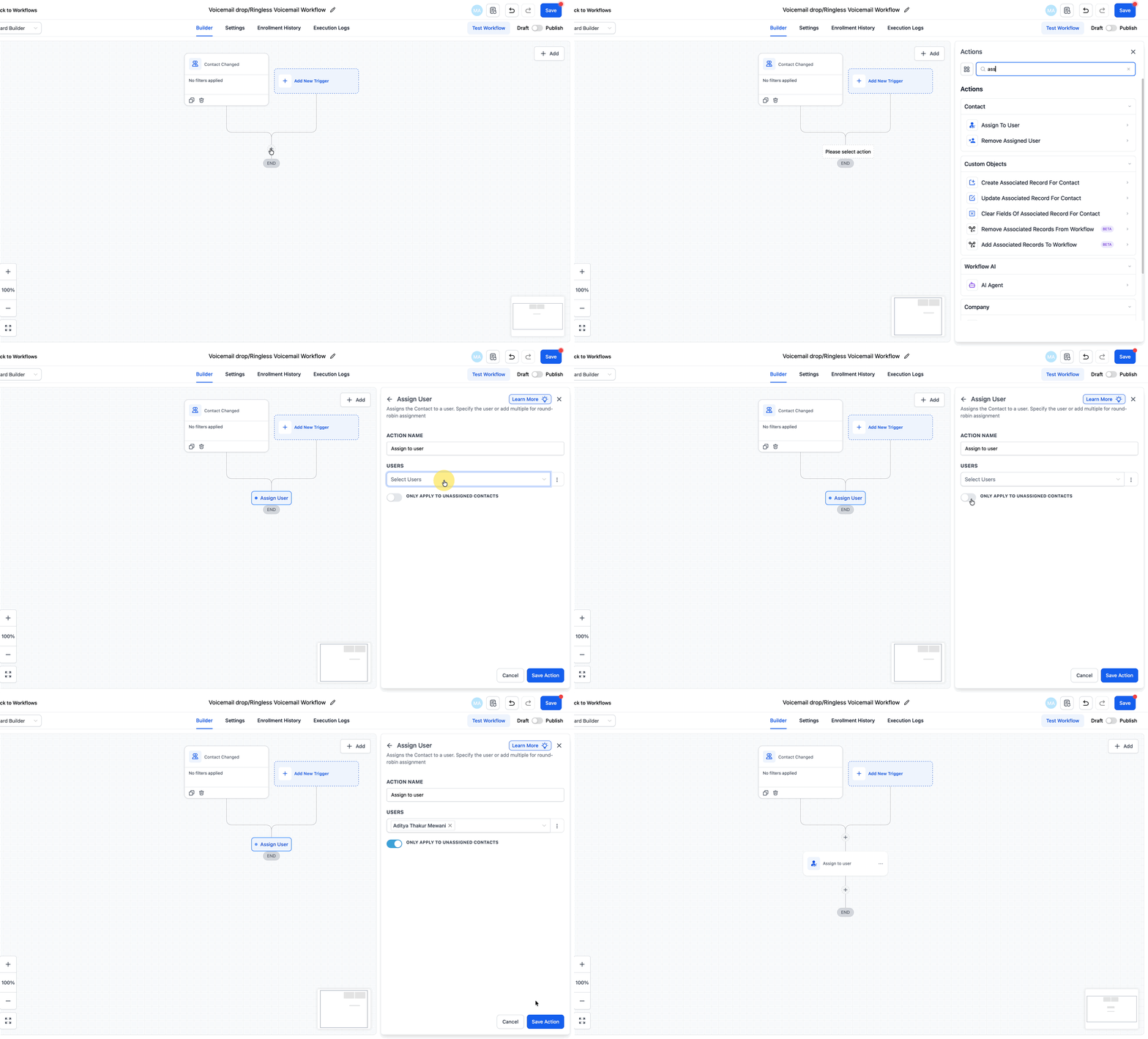
GoHighLevel Workflows are the engine for automating your voicemail drops. By following these steps, you will create a sequence that automatically delivers your pre-recorded message to contacts based on specific triggers. This ensures timely and consistent communication without manual intervention, making your outreach highly efficient.
✅ Voicemail drops are highly effective for appointment confirmations, no-show recovery sequences, and nurturing new leads. Tailor your message content to the specific stage of the customer journey for maximum impact and relevance.
Always test your voicemail drops by running a test contact through your workflow before publishing it to a live audience. This helps confirm that your message plays correctly and the automation fires as expected.
Troubleshooting Common Issues
Common Mistakes to Avoid
- →Forgetting to obtain prior express consent from contacts, leading to legal non-compliance and potential penalties.
- →Using audio files that are too large, in unsupported formats, or of poor quality, which can cause delivery issues or a bad recipient experience.
- →Not thoroughly testing the voicemail drop workflow with a test contact before publishing, which can result in unexpected behavior or missed messages.
- →Ignoring the daily voicemail drop limits, causing campaigns to halt prematurely and missing outreach opportunities.
- →Creating overly complex workflows with too many conditional branches, making it difficult to troubleshoot if a voicemail drop fails to send.
Frequently Asked Questions
Start your 30-day GoHighLevel free trial
Everything in this guide is in your free trial. 30 days, no credit card — the platform behind 78+ revenue systems.
Some links are affiliate links — if you sign up we may earn a commission, at no extra cost to you. We only recommend GoHighLevel because we build on it every day.

Arsalan writes GHL guides from real build experience — 78+ systems, $9.2M in client pipeline. Wharton, CXL & Google certified.
Connect on LinkedIn