Revset
Book a Free Audit

30-minute call · No obligation

HomeGHL HubIntegrations & APIBrand GoHighLevel System Links with a Custom API Domain
REVSET LABS · EXPERT GUIDE·Integrations & API

Brand GoHighLevel System Links with a Custom API Domain

703 words·3 min read·Updated 28 April 2026·beginner·
Arsalan ZaffarArsalan ZaffarLinkedIn

👉 Start your 30-day GoHighLevel free trial.

Start 30-Day Free Trial
Quick Answer

To brand system-generated links in GoHighLevel, go to Agency Settings → Company → Whitelabel → Domains for agency-wide branding, or Sub-Account Settings → Business Profile for individual sub-accounts. This process typically takes 10-20 minutes, not including DNS propagation time.

Key Takeaways
  • Brand all system-generated GoHighLevel links (forms, surveys, calendars, etc.) with your custom domain to enhance trust and recognition.
  • Configure API domains at the Agency level for a default setting across all sub-accounts, saving setup time.
  • Override agency-level branding by setting a specific branded domain for individual sub-accounts to match client branding.
  • Always use a subdomain (e.g., `links.yourdomain.com`) for API branding to prevent conflicts with your main website.
  • Remember to click 'Update Company' (Agency) or 'Update Information' (Sub-Account) to save your changes after configuration.

What is a GoHighLevel API Domain?

A GoHighLevel API domain allows you to customize the web address for all system-generated links. Instead of seeing a generic GoHighLevel address, your clients and leads will see your own branded domain. This creates a consistent and professional experience for anyone interacting with your marketing assets. Branding your links significantly enhances trust and recognition. It ensures that every link, from a form submission to a calendar booking, reflects your business identity. This customization applies to various critical links within GoHighLevel, including those for forms, surveys, calendar bookings, trigger links, payment links, and review requests.

How Do I Set Up an Agency-Level API Domain?

Setting an API domain at the agency level applies your chosen branding across all sub-accounts by default. This is ideal for agencies that want a consistent look for all their clients' system-generated links. It reduces manual setup and ensures a professional online presence from the start.

1
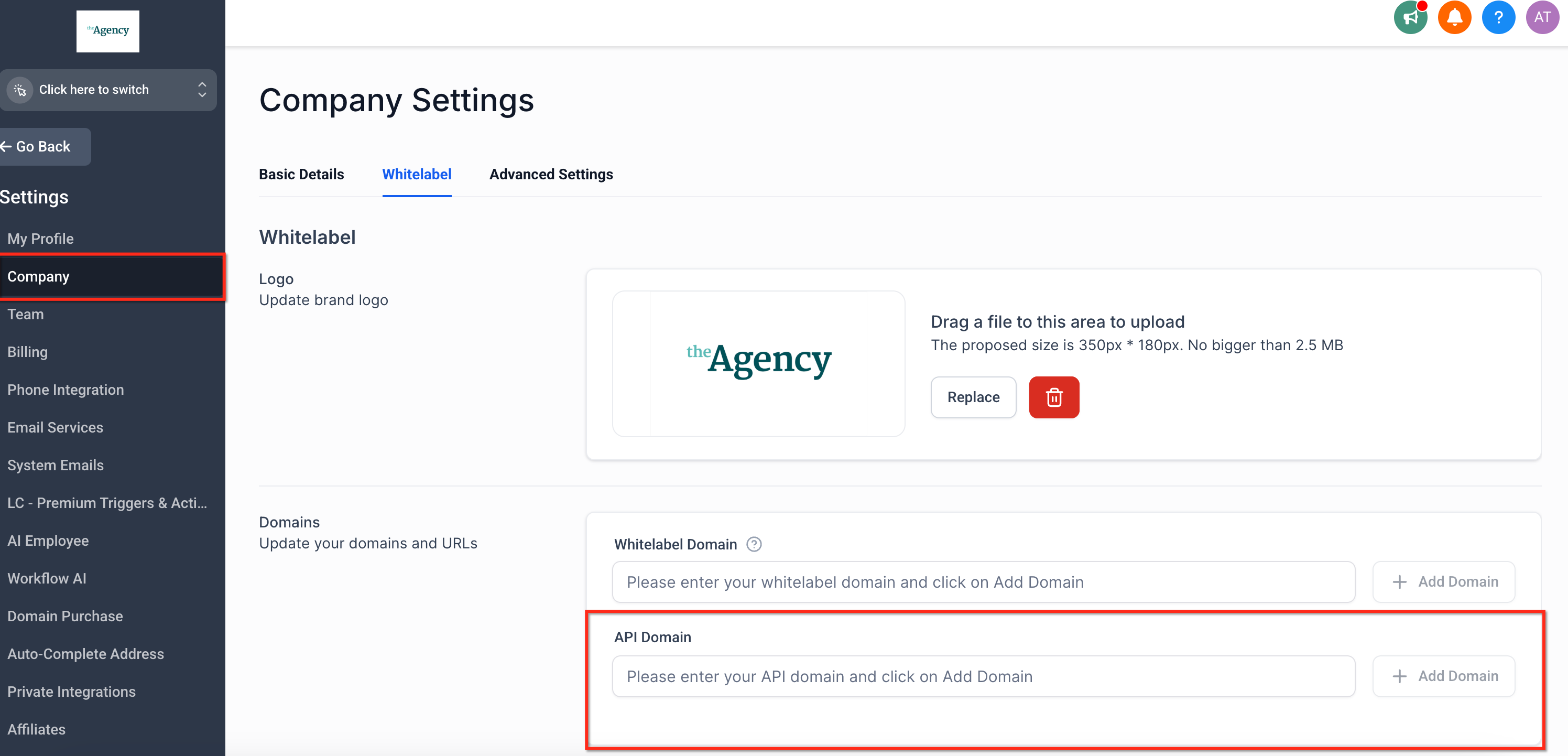
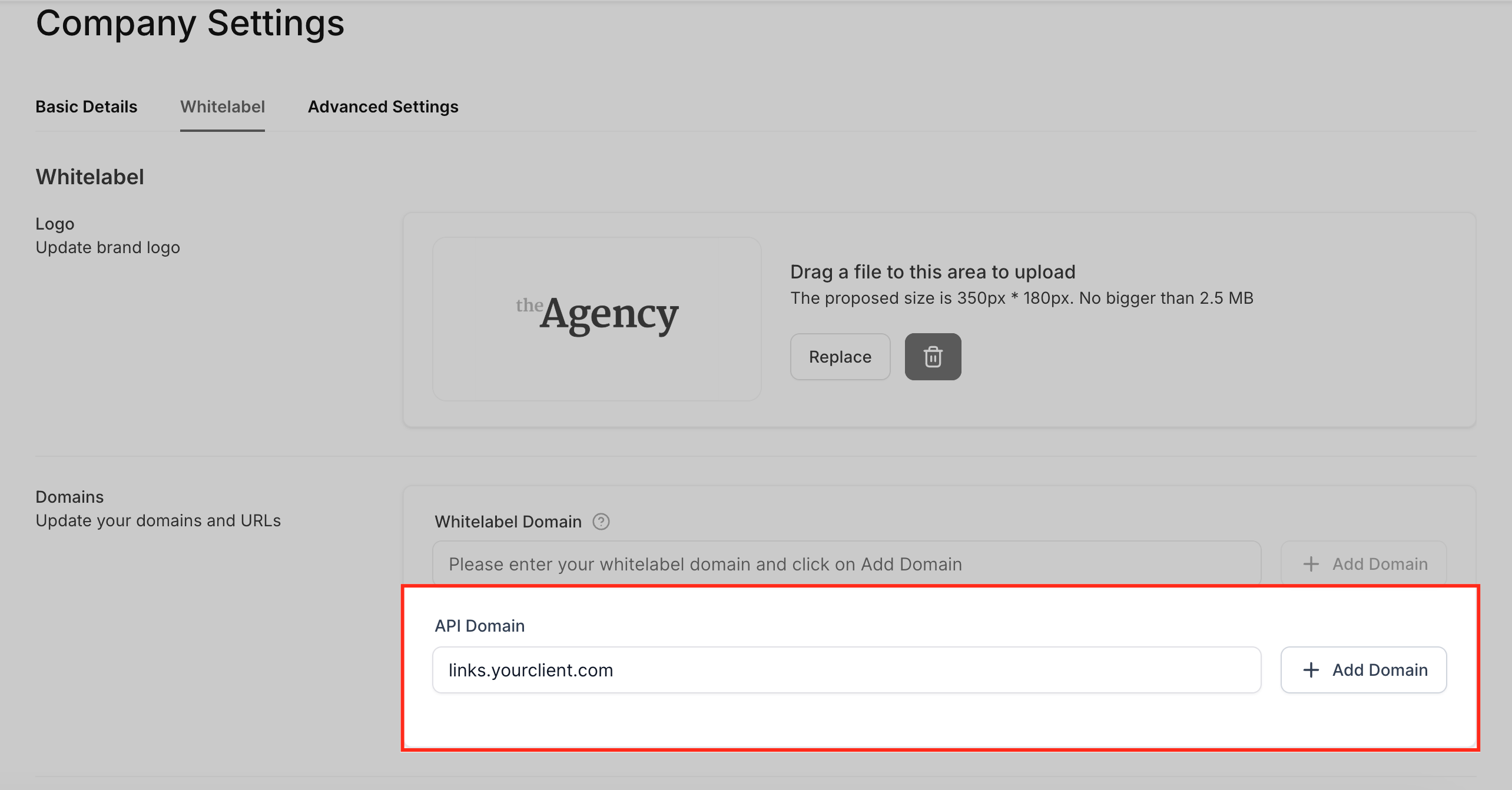
Access Agency SettingsFrom your main dashboard, switch to Agency View. Click Settings in the left sidebar, then select Company from the menu. Navigate to the Whitelabel tab and choose Domains.
2
Add Your Custom DomainClick the Add Domain button. The system will launch a domain connection wizard to guide you through the process. Follow the prompts to automatically create the necessary DNS records in your domain registrar.
3
Manually Create CNAME Record (If Needed)If the wizard cannot connect automatically, you must create a CNAME record manually. Log in to your domain registrar (e.g., GoDaddy, CloudFlare, Namecheap) and go to your DNS settings. Create a new CNAME record with the 'Name' as your chosen subdomain (e.g., links) and the 'Target' as brand.ludicrous.cloud.
4
Save Agency Company SettingsScroll to the bottom of the Company page within Agency Settings. Click the Update Company button to save all your changes. Your new agency-level API domain is now active.

✅ Crucial: Always click Update Company at the bottom of the page after making any changes to your Agency Settings. Failure to save means your changes will not take effect.

🔥 Pro Tip

Use a descriptive subdomain like `links.youragency.com` or `app.youragency.com` to clearly indicate the purpose of the links to your audience.

Try GoHighLevel Free

Start your 30-day GoHighLevel free trial

Everything in this guide is in your free trial. 30 days, no credit card — the platform behind 78+ revenue systems.

Start 30-Day Free Trial

Some links are affiliate links — if you sign up we may earn a commission, at no extra cost to you. We only recommend GoHighLevel because we build on it every day.

How Do I Brand Links for a Specific Sub-Account?

You can customize system-generated links for individual sub-accounts, overriding the agency-level API domain. This allows each client to have their own unique branding on forms, surveys, and other links. This approach enhances brand identity and builds trust for each specific business.
1
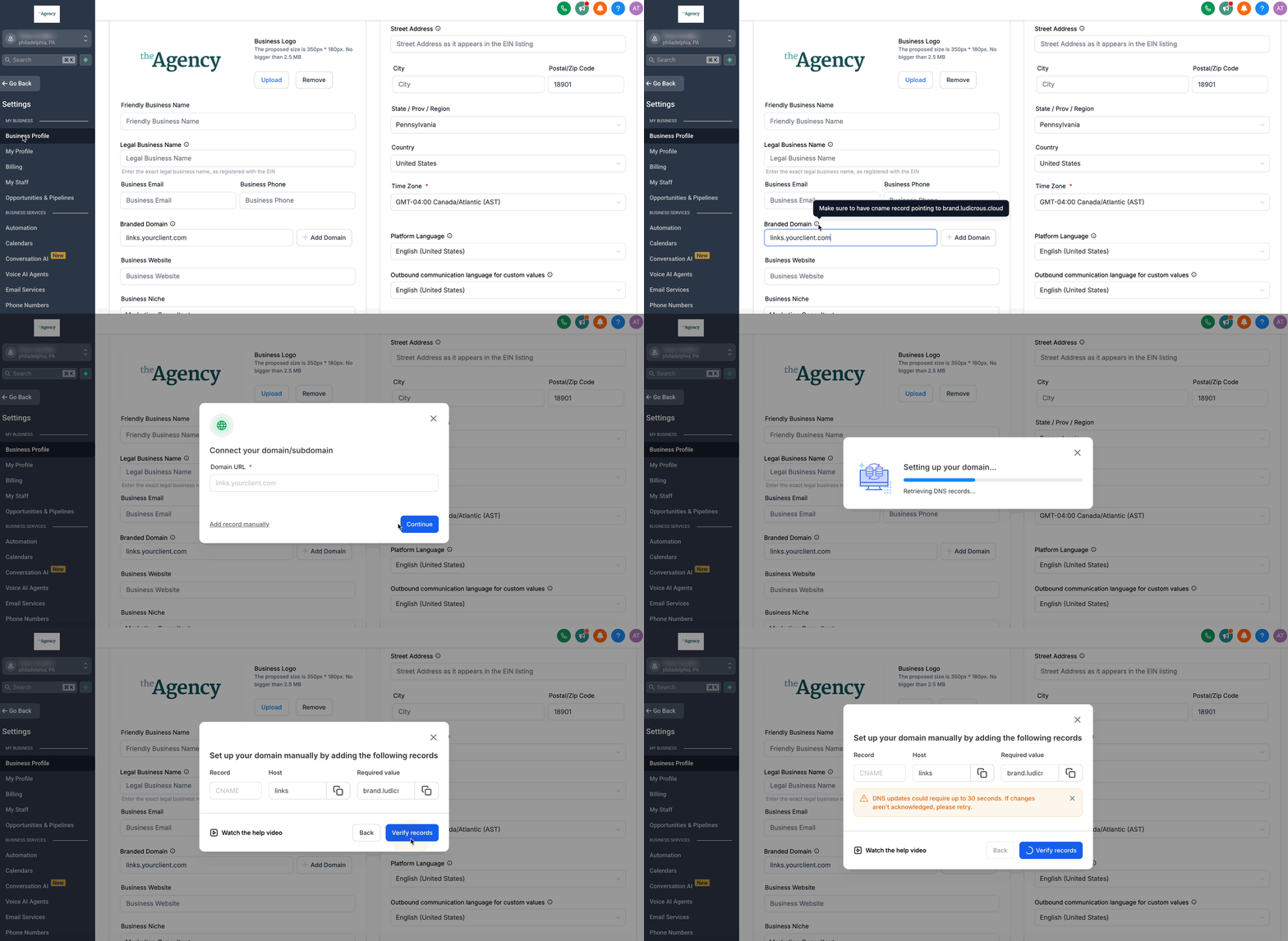
Access Sub-Account SettingsSwitch to the Sub-Account View for the specific client you wish to brand. Click Settings in the left sidebar, then select Business Profile.
2
Enter Your Branded DomainLocate the Branded Domain field. Input the subdomain you want this sub-account to use for system-generated links (e.g., links.yourclient.com). This will be the domain visible in all client-facing links.
GoHighLevel screenshot
0
3
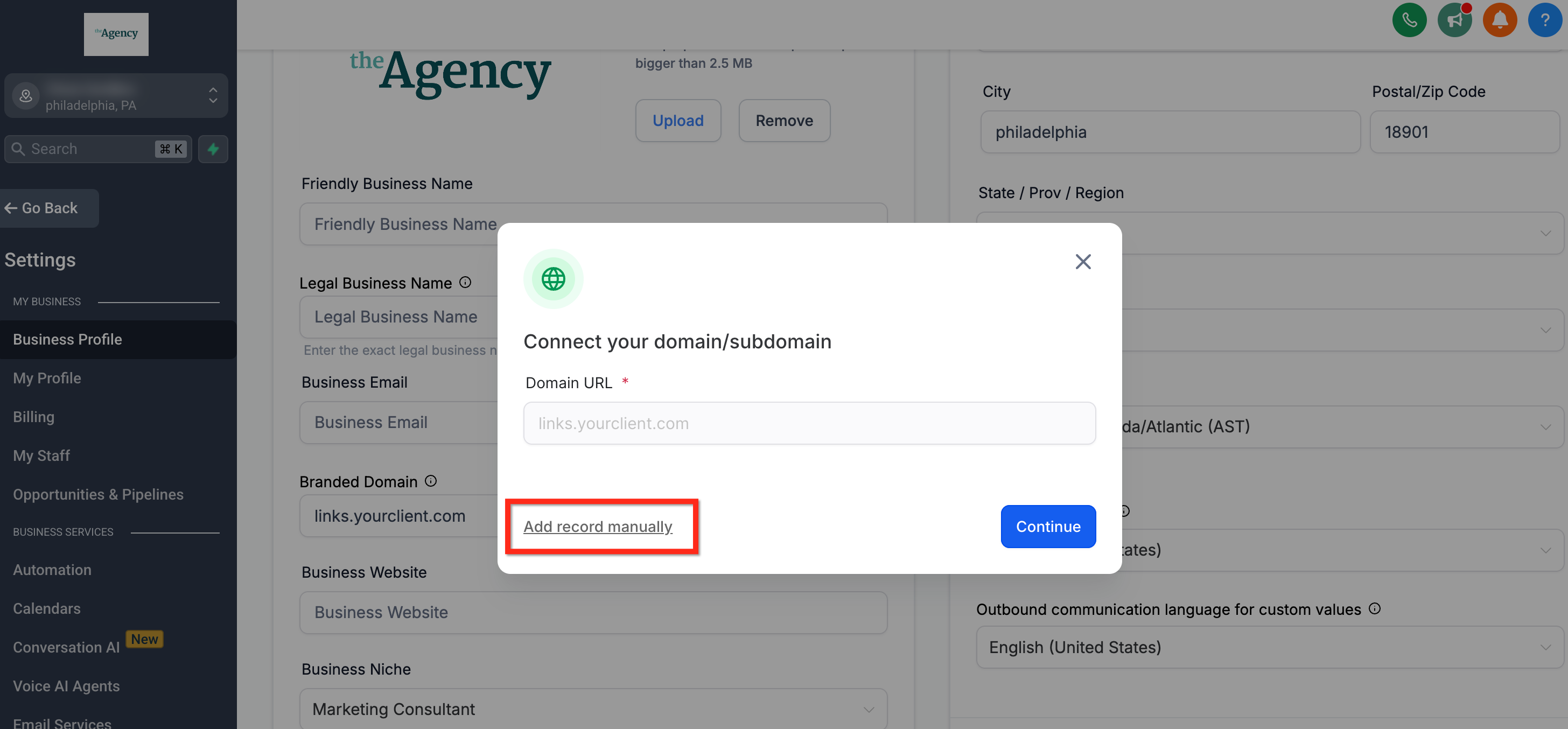
Add the Domain via WizardClick Add Domain next to the field. The domain connection wizard will launch automatically. Follow its instructions to create the CNAME record in your domain registrar, linking your subdomain to GoHighLevel.
4
Manually Create CNAME Record (If Needed)If the wizard doesn't work, manually create a CNAME record in your domain registrar's DNS settings. Set the 'Name' to your chosen subdomain (e.g., links) and the 'Target' to brand.ludicrous.cloud.
GoHighLevel screenshot
1
5
Save Business Profile ChangesScroll to the bottom of the Business Profile page. Click the Update Information button to save your new branded domain. This activates the custom branding for this sub-account's links.
GoHighLevel screenshot

✅ Important: You must click Update Information at the bottom of the Business Profile page to apply your changes. Without saving, the new branded domain will not take effect.

🔥 Pro Tip

If you manage multiple sub-accounts, consider creating a spreadsheet to track each sub-account's branded domain and their DNS record details for easy reference.

Troubleshooting Common Issues

⚠️ My links still show the default GoHighLevel domain after setup.
DNS changes can take up to 48 hours to propagate globally, though often faster. Verify your CNAME record is correctly configured in your domain registrar and wait a few hours. Clear your browser cache and try again.
⚠️ The domain connection wizard failed to create the CNAME record.
This can happen with certain registrars or complex DNS setups. Proceed with manual CNAME record creation in your domain registrar's DNS settings. Ensure the 'Name' is your subdomain and the 'Target' is `brand.ludicrous.cloud`.
⚠️ I updated my API/Branded domain, but it's not reflecting the new changes.
First, clear the existing domain field in GoHighLevel and click 'Update Company' or 'Update Information'. Then, re-enter the desired new subdomain and save again. This forces a refresh of the domain settings.
⚠️ My website stopped working after setting up the API domain.
You likely used your root domain (e.g., yourdomain.com) instead of a subdomain (e.g., links.yourdomain.com). Always use a subdomain for API branding to avoid conflicts with your main website's DNS records.
⚠️ I want to use this domain for custom API integrations.
The API Domain feature is solely for branding GoHighLevel's system-generated links. It is not designed for custom API integrations or development purposes. Refer to GoHighLevel's official API Documentation for integration details.

Common Mistakes to Avoid

  • Forgetting to click 'Update Company' or 'Update Information' after making changes.
  • Using a root domain (e.g., yourdomain.com) instead of a subdomain (e.g., links.yourdomain.com).
  • Expecting DNS changes to propagate instantly; it can take up to 48 hours.
  • Attempting to use the API Domain feature for custom API integrations or development.
  • Not verifying the CNAME record details (Name and Target) exactly as provided.

Frequently Asked Questions

QWhat types of GoHighLevel links are affected by this branding?
The custom API domain brands various system-generated links. This includes links for forms, surveys, calendar bookings, trigger links, payment links, and review requests. Your branded domain will appear in all these links, ensuring consistent client-facing communication.
QCan I use a different branded domain for each of my sub-accounts?
Yes, absolutely. You can set a unique branded domain for each individual sub-account. This sub-account-level setting overrides any agency-level API domain. This flexibility allows each client to have their own distinct brand identity on all their system-generated links.
QWhat is `brand.ludicrous.cloud` and why is it the CNAME target?
`brand.ludicrous.cloud` is a GoHighLevel internal server address. When you create a CNAME record, you are essentially telling your domain that `links.yourdomain.com` should point to GoHighLevel's server. This allows GoHighLevel to serve your branded links through your custom subdomain.
QHow do I verify if my branded domain is working correctly?
After setting up your branded domain and allowing time for DNS propagation, test it. Generate a new link for a form or calendar and check the URL. It should display your custom subdomain instead of the default GoHighLevel address. You can also use online DNS checkers to confirm your CNAME record is active.
QIs it recommended to use my root domain (e.g., `mydomain.com`) as the API domain?
No, it is strongly recommended to use a subdomain (e.g., `links.mydomain.com`, `app.mydomain.com`). Using your root domain can cause conflicts with your existing website, email, or other services. A subdomain provides clear separation and prevents unintended disruptions to your online presence.
Try GoHighLevel Free

Start your 30-day GoHighLevel free trial

Everything in this guide is in your free trial. 30 days, no credit card — the platform behind 78+ revenue systems.

Start 30-Day Free Trial

Some links are affiliate links — if you sign up we may earn a commission, at no extra cost to you. We only recommend GoHighLevel because we build on it every day.

Arsalan Zaffar
Arsalan Zaffar
Revset Labs · Revenue Systems · 78+ GHL Builds

Arsalan writes GHL guides from real build experience — 78+ systems, $9.2M in client pipeline. Wharton, CXL & Google certified.

Connect on LinkedIn
Tags:GoHighLevelAPI DomainBrandingCustom DomainWhitelabelDNSSystem Links