
Revset
Book a Free Audit

30-minute call · No obligation

HomeGHL HubConversations & MessagingTroubleshoot SMS Delivery Problems in GoHighLevel Effectively
REVSET LABS · EXPERT GUIDE·Conversations & Messaging

Troubleshoot SMS Delivery Problems in GoHighLevel Effectively

1,193 words·5 min read·Updated 27 April 2026·beginner·
Arsalan ZaffarArsalan ZaffarLinkedIn

👉 Start your 30-day GoHighLevel free trial.

Start 30-Day Free Trial
Quick Answer

To troubleshoot SMS delivery issues in GoHighLevel, go to Conversations and locate the message with a red error badge. Review the specific error message to identify the problem, then apply the appropriate fix. This process typically takes 5-10 minutes.

Key Takeaways
  • Always check the **Conversations** tab first for immediate error feedback on failed SMS messages.
  • Verify phone number formatting, including the correct country code, to prevent 'invalid number' errors.
  • Monitor your SMS credit balance regularly to avoid delivery failures due to insufficient funds.
  • Craft clear, concise messages and avoid spam triggers to prevent carrier filtering.
  • Respect contact opt-out preferences and re-engage only with their explicit consent.

Understanding SMS Delivery in GoHighLevel

When you send an SMS message from GoHighLevel, it embarks on a journey through several critical stages. First, GoHighLevel sends your message to Twilio, its underlying SMS provider. Twilio then routes the message to the recipient's mobile carrier. Finally, the mobile carrier attempts to deliver the message to the end user's device. A failure at any point in this chain can prevent your message from reaching its destination. Understanding this flow helps pinpoint where issues might arise.

Where to Find SMS Delivery Errors in GoHighLevel

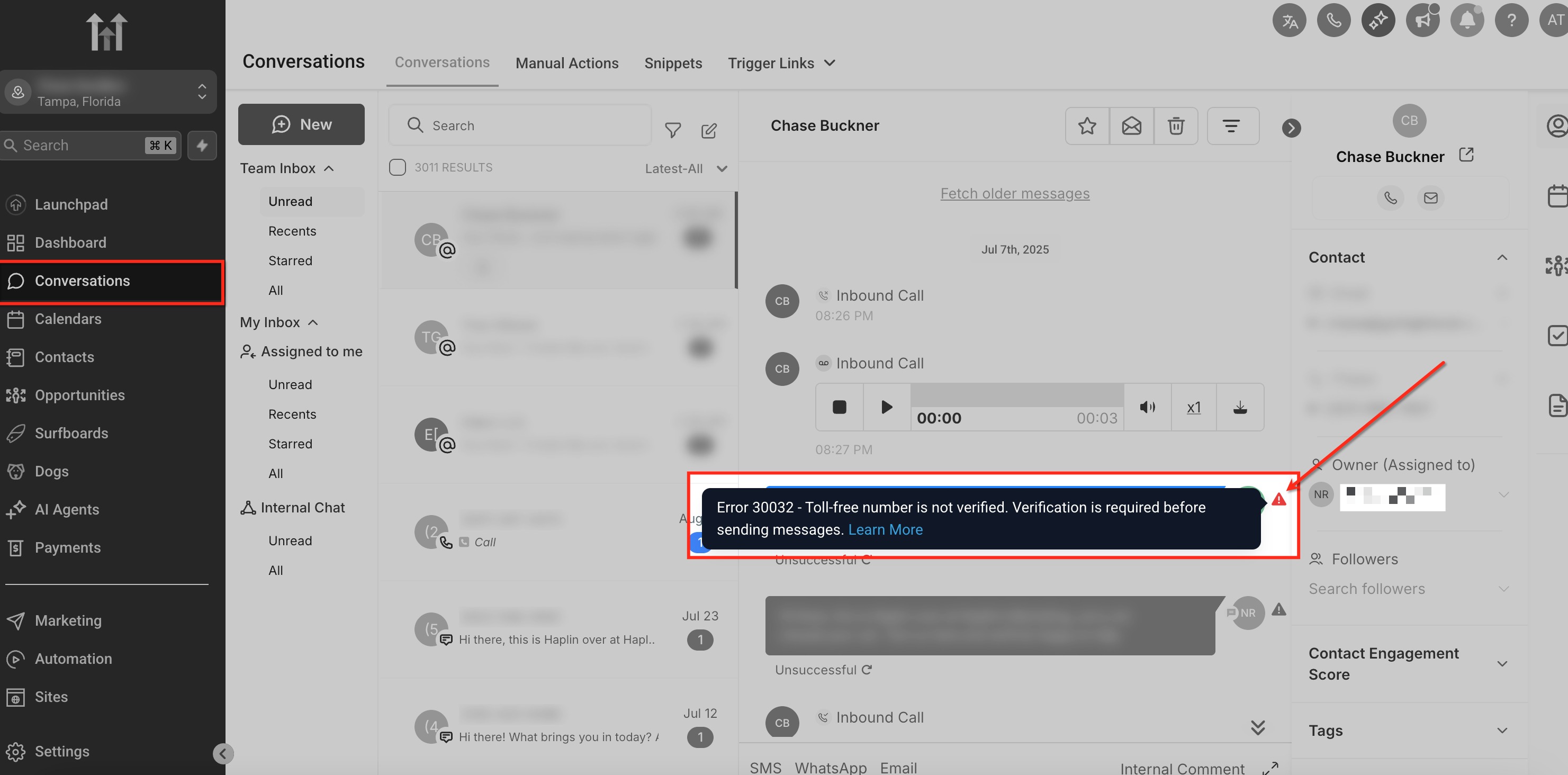
GoHighLevel provides immediate feedback on message delivery status directly within the platform. If a message fails to send or deliver, you will see a clear indication in the relevant conversation thread. This is your first stop for troubleshooting any SMS issues.
1
Access the Conversations TabFrom your GoHighLevel dashboard, click on Conversations in the left-hand menu. This tab displays all your active and past message exchanges with contacts.
2
Locate the Failed MessageScroll through the conversation thread to find the specific SMS message that you suspect failed. Look for a message bubble accompanied by a red error badge or an explicit error message.
3
Identify the Error Message and CodeClick on the failed message to reveal the full error details. GoHighLevel will display a specific error message and often an associated error code, which are crucial clues for diagnosing the problem.
GoHighLevel screenshot
0
🔥 Pro Tip

Always check the Conversations tab first. This is the fastest way to get real-time feedback on your message delivery status directly within GoHighLevel.

Common SMS Delivery Errors and How to Fix Them

Most SMS delivery issues stem from a few common problems. By understanding these frequent errors and their specific solutions, you can quickly get your messages back on track. Use the error message found in the Conversations tab to guide your fix.
1
Error: Invalid Phone Number / Formatting IssuesThis error occurs when the recipient's phone number is incorrectly formatted, incomplete, or does not exist. It is a very common reason for failed messages. Fix: Verify the contact's phone number in their profile by going to Contacts → All Contacts and searching for the contact. Ensure the number includes the correct country code (e.g., +1 for US/Canada) and contains only digits, without spaces, dashes, or parentheses. Correct the number and try resending the message.
2
Error: Contact Opted Out / DNDIf a contact has previously replied 'STOP' or is marked as 'Do Not Disturb' (DND), your messages will not be delivered to them. This is a compliance measure to respect user preferences. Fix: Check the contact's profile in Contacts → All Contacts to see if they are marked as 'DND' or have opted out of SMS. You must respect their wishes; do not attempt to force messages. If they wish to receive messages again, they must explicitly opt-in by texting 'START' or 'UNSTOP' to your number.
3
Error: Message Blocked by Carrier / FilteringMobile carriers use sophisticated filtering systems to block spam, phishing, and unwanted messages. If your message contains suspicious links, excessive capitalization, common spam keywords, or is too long, it might be filtered. Fix: Review your message content. Shorten URLs using a reputable link shortener, avoid all caps, reduce emojis, and remove any overly promotional or spammy phrases. Break long messages into multiple shorter ones, as SMS is limited to 160 characters per segment. Try resending with revised content.
4
Error: Insufficient Funds / Twilio BalanceSMS delivery incurs a small cost per message. If your GoHighLevel SMS credits are depleted, or if there's an issue with your underlying Twilio account balance, messages will fail to send. Charges apply even for attempted messages. Fix: Navigate to Agency Settings → Company → SMS & Email to check your GoHighLevel SMS credit balance. If low, add more credits. If using your own Twilio account, log into your Twilio console to ensure your balance is sufficient and your account is active.
5
Error: Temporary Network Issue / UndeliverableSometimes, messages fail due to temporary network congestion, recipient phone issues, or other transient problems. These are usually not within your control and can resolve on their own. Fix: Wait a few minutes and try resending the message. If it continues to fail, review the contact's number and previous messages for other potential issues. If the problem persists for multiple contacts, contact GoHighLevel support.
GoHighLevel screenshot
0

⚠️ Be cautious when resending messages. Repeatedly sending to opted-out contacts or using spammy content can lead to your numbers being flagged or blocked by carriers.

✅ Note: Charges apply once a message is attempted, even if it fails delivery later in the process. This is standard practice across SMS providers.

🔥 Pro Tip

Proactively validate phone numbers using a third-party service upon contact entry. This prevents 'invalid number' errors before they even occur, saving you time and credits.

Try GoHighLevel Free

Start your 30-day GoHighLevel free trial

Everything in this guide is in your free trial. 30 days, no credit card — the platform behind 78+ revenue systems.

Start 30-Day Free Trial

Some links are affiliate links — if you sign up we may earn a commission, at no extra cost to you. We only recommend GoHighLevel because we build on it every day.

Proactive Steps to Prevent SMS Delivery Issues

Prevention is always better than cure. By implementing a few best practices, you can significantly reduce the likelihood of encountering SMS delivery problems in GoHighLevel. These steps help ensure your messages reach your audience consistently.

1
Validate Phone Numbers Upon EntryAlways ensure new contact phone numbers are correctly formatted with the country code. Utilize GoHighLevel forms with phone number validation or integrate with a validation service to catch errors early.
2
Monitor SMS Credit Balance RegularlySet up alerts or routinely check your SMS credit balance within GoHighLevel. This prevents unexpected message failures due to insufficient funds, especially during high-volume campaigns.
3
Craft Clear and Compliant MessagesWrite messages that are concise, clear, and avoid common spam triggers like excessive capitalization, emojis, or suspicious links. Always include an opt-out option (e.g., 'Reply STOP to unsubscribe').
4
Adhere to SMS Compliance RegulationsUnderstand and follow local SMS regulations like CTIA guidelines and TCPA in the US. This includes obtaining explicit consent before sending messages and providing easy opt-out mechanisms.
🔥 Pro Tip

Maintain a 'clean' contact list by regularly removing invalid or opted-out numbers. This improves deliverability rates and optimizes your SMS credit usage.

When to Contact GoHighLevel Support

While most common SMS delivery issues can be resolved using the steps above, some complex problems require expert assistance. If you've exhausted all troubleshooting steps and are still experiencing widespread or persistent delivery failures, it's time to reach out to GoHighLevel support.

1
Gather All Error DetailsBefore contacting support, collect specific error messages, error codes, affected contact numbers, and the exact timestamps of failed messages. This information helps support agents diagnose the issue faster.
2
Contact GoHighLevel SupportSubmit a support ticket through your GoHighLevel account. Clearly describe the problem, list the troubleshooting steps you've already taken, and provide all gathered error details. Be prepared to provide example conversations.

Troubleshooting Common Issues

⚠️ If you see 'Error: Invalid Phone Number' or 'Undeliverable'
Correct the contact's phone number format including the full country code (e.g., +1 for North America) and remove any non-digit characters.
⚠️ If you see 'Error: Contact Opted Out' or 'DND'
Check the contact's profile for a 'DND' status. Respect their opt-out preference; they must initiate an opt-in to receive further messages.
⚠️ If you see 'Error: Message Blocked by Carrier' or 'Filtered'
Review the message content for spam triggers (e.g., all caps, too many emojis, suspicious links) and shorten the message if it exceeds 160 characters. Try sending a simpler message.
⚠️ If you see 'Error: Insufficient Funds' or 'Account Balance Low'
Replenish your GoHighLevel SMS credits in Agency Settings → Company → SMS & Email, or check your linked Twilio account balance.
⚠️ If messages fail intermittently with no clear error
Wait a few minutes and retry sending. Temporary network issues can resolve on their own. If persistent, gather details and contact GoHighLevel support.

Common Mistakes to Avoid

  • Not checking the Conversations tab first for immediate error feedback.
  • Ignoring the necessity of including the correct country code in phone numbers.
  • Sending overly promotional or spammy messages that trigger carrier filters.
  • Forgetting to monitor and replenish SMS credit balance, leading to unexpected service interruptions.
  • Failing to confirm a contact's opt-in status before sending marketing or bulk messages.

Frequently Asked Questions

QWhy am I getting charged for failed SMS messages in GoHighLevel?
GoHighLevel charges for SMS messages once they are attempted to be sent through the underlying provider (Twilio). This means that even if a message fails later in the delivery process, for reasons like an invalid number or carrier filtering, the initial attempt incurs a cost. These charges cover the processing and routing efforts, regardless of the final delivery status.
QHow can I check detailed message logs in Twilio for GoHighLevel SMS?
To view detailed message logs, you need access to the Twilio account linked with your GoHighLevel setup. Log into your Twilio console, navigate to the **Monitor → Logs → Messaging** section. Here you can find comprehensive delivery reports, specific error codes, and message statuses directly from Twilio, offering deeper insights into why a message failed.
QWhat exactly is 'carrier filtering' and how does it affect my SMS delivery?
Carrier filtering refers to the automated systems used by mobile network operators to block or flag messages they deem unwanted, spam, or potentially fraudulent. Filters analyze message content, sender reputation, and volume. If your message triggers these filters (e.g., too many links, certain keywords, high volume to unengaged contacts), it may be blocked before reaching the recipient.
QHow do I know if a contact has opted out of SMS messages in GoHighLevel?
You can check a contact's opt-out status directly within GoHighLevel. Go to **Contacts → All Contacts**, search for the contact, and open their profile. Look for a 'DND' (Do Not Disturb) status or an indication that they have opted out of SMS. If they have opted out, you must not send them further messages without their explicit re-consent.
QWhat is the best practice for formatting phone numbers to ensure SMS delivery?
The best practice is to store phone numbers in the E.164 international format. This means including a '+' sign followed by the country code, and then the full subscriber number, without any spaces, dashes, or parentheses. For example, a U.S. number should be +1xxxxxxxxxx. This ensures global compatibility and reduces 'invalid number' errors.
Try GoHighLevel Free

Start your 30-day GoHighLevel free trial

Everything in this guide is in your free trial. 30 days, no credit card — the platform behind 78+ revenue systems.

Start 30-Day Free Trial

Some links are affiliate links — if you sign up we may earn a commission, at no extra cost to you. We only recommend GoHighLevel because we build on it every day.

Arsalan Zaffar
Arsalan Zaffar
Revset Labs · Revenue Systems · 78+ GHL Builds

Arsalan writes GHL guides from real build experience — 78+ systems, $9.2M in client pipeline. Wharton, CXL & Google certified.

Connect on LinkedIn
Tags:GoHighLevelSMSTroubleshootingDelivery IssuesError CodesMessaging